.svg)


Walk through almost any store doing a few thousand orders a month and you'll see the same morning. Someone copies yesterday's orders into the warehouse portal. Someone else answers forty "where's my order?" emails before lunch, each one a lookup in Shopify and a paste into the reply. Refund requests sit in a shared inbox until the owner has a spare hour. None of it is hard. It's constant, and it's where your team's week goes.
Most guides to ecommerce automation hand you a list of twenty things you could automate. That's the easy part. The hard part is the order: what to build first, what can wait, and which actions should never run without a person looking. This guide gives you that order, and the one rule we use to decide which steps run on their own. It's the same rule behind the systems on our ecommerce automation services page, and you can apply it to your store before you talk to anyone, us included.
Automate the volume. Gate the money.
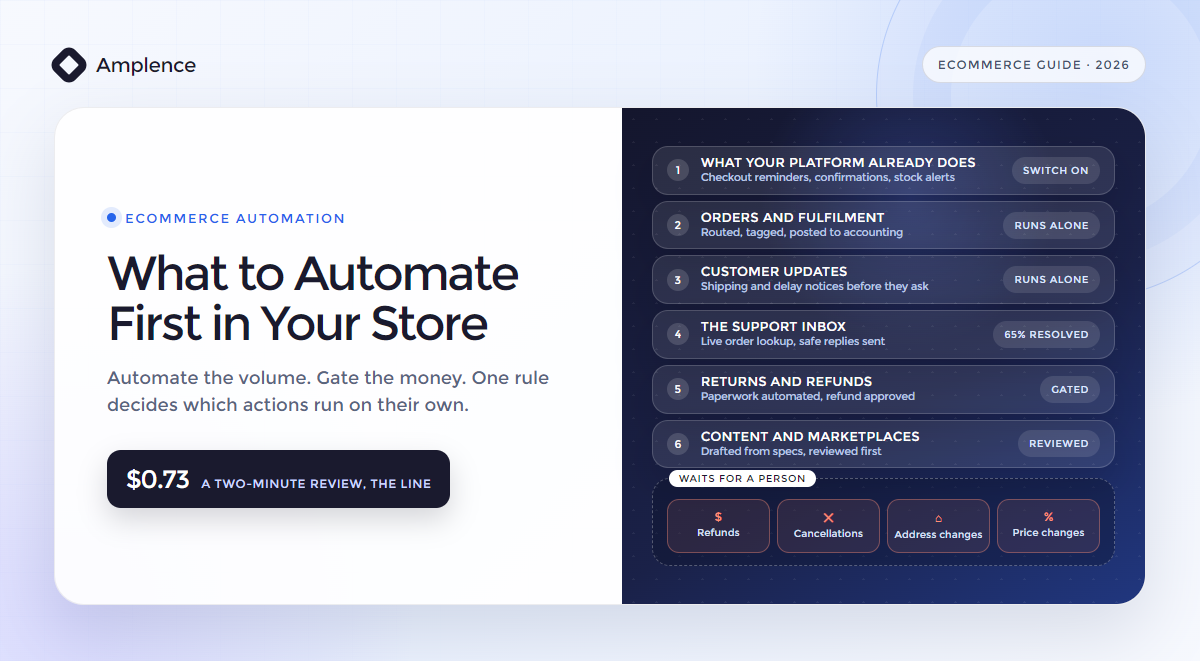
Ecommerce automation is software doing the repetitive work of running an online store: moving orders between systems, sending customer updates, answering routine questions from the live order record, flagging low stock and preparing refunds for someone to approve. Automate in this order: switch on what your platform already does, then order routing, then customer updates, then the support inbox, then returns, then product content and marketplaces. To decide what runs on its own, multiply the chance of a mistake by what one mistake costs. If that's more than a two-minute review, $0.73 at a $22 loaded hour, a person approves it.
What ecommerce automation actually is
Ecommerce automation is any step in running your store that happens because a rule fired, not because someone remembered. An order comes in and gets tagged. Stock drops below twenty and your buyer gets a message. A customer asks where their parcel is and gets an answer with the tracking link in it. It works in three layers, and knowing which one a job needs saves you most of the cost.
The first layer is rules inside your platform. On Shopify that's Flow, a free app on the Basic, Grow, Advanced and Plus plans, though not on Starter. It watches events in your store, like an order being created or inventory changing, checks conditions and takes actions: tag the order, hold fulfilment, email your team. If a job starts and ends inside Shopify, Flow is usually where it belongs.
The second layer is workflows between your apps. Your order has to reach your warehouse, your accounting system and, often, a spreadsheet someone still checks. Tools like n8n, Make and Zapier carry data between systems that don't talk to each other. This is where most of a growing store's manual work actually lives, and it's where we spend most of our build time. Our comparison of n8n, Make and Zapier covers which one fits which store.
The third layer is judgment: a model reading a customer's email, a returns note or a supplier's spec sheet, and writing something back. It's the layer every vendor wants to sell you first, and the one you need last. A model earns its cost where text has to be read or written. Everywhere else, a rule is cheaper and faster, and it never has an off day.
The one rule that decides what runs on its own
Every automation guide tells you to keep a human in the loop for sensitive actions, and stops there. That isn't a rule you can build. Here's the one we use for every action in a store, the same one our guardrails guide applies to AI agents.
Let an action run on its own when its error rate times the cost of one mistake is less than the cost of a two-minute review. At a $22 loaded hour, that review costs $0.73.
Put your measured accuracy in and the line becomes a price. At 95% accuracy, one action in twenty goes wrong, so anything whose mistake costs less than about $14.60 is cheaper to let run and fix afterwards. Anything whose mistake costs more is cheaper to check first. Here's how that plays out on the actions stores automate most.
| Action | How often | Cost of one mistake | Expected loss at 95% | Verdict |
|---|---|---|---|---|
| Tag an order and route it to the right warehouse | Every order | About $3.67, ten minutes to spot and fix | $0.18 | Runs on its own |
| Send a shipping or delay update | Every order | About $3.67, one follow-up email | $0.18 | Runs on its own |
| Answer "where's my order?" from the live order record | Most tickets | About $3.67, one follow-up | $0.18 | Runs on its own |
| Change a shipping address before dispatch | Weekly | About $15, a redelivery | $0.75 | A person approves |
| Publish an AI-written product description | Per listing | About $25, one return from a wrong detail | $1.25 | A person reviews first |
| Refund a $40 order | Daily | $40 | $2.00 | A person approves |
| Cancel a $60 order that's already been picked | Weekly | $60 | $3.00 | A person approves |
| Change a price | Occasional | No ceiling until someone notices | No ceiling | A person approves, inside hard limits |
Two things make this rule work. First, the error rate is one you measure, not one a vendor quotes you. Start every action gated, log what a person changes, and let an action run on its own once your own logs show it has earned it. Second, a gate isn't a failure of automation. Finding the order, checking the policy and drafting the refund all still happen automatically. Your person spends two minutes deciding, not twenty minutes gathering.
What to automate first, in order
- Switch on what you already pay forWhat does your platform already do?Order confirmations, shipping notifications, low-stock alerts and abandoned checkout emails ship with most platforms and email tools. With the average documented cart abandonment rate at 70.22% across 50 studies, the checkout reminder is the first automation almost every store should have, and you rarely need to build it.
- Orders and fulfilmentWhere does anyone retype an order?Route each order to the right warehouse or 3PL, tag it by risk or value, and post it to your accounting system. It runs on every order, needs no judgment and is cheap to fix when it's wrong.
- Customer updatesWhat are customers about to ask you?Send shipping, delay and delivery updates before the customer emails. Every update you send is a "where's my order?" email nobody has to answer.
- The support inboxWhat's left in the inbox?Classify every email, pull the live order record, draft the reply, send the safe ones and route the rest to a person with the context attached. On one store that resolved 65% of 5,000 monthly emails.
- Returns and refundsWhere does money leave?Check eligibility against your policy, flag fraud signals, issue labels and update the customer automatically. The refund itself waits for a person above your limit.
- Content and marketplacesWhat grows with your catalogue?Draft product descriptions from your specs for someone to review, and pull marketplace reports and listing checks through the official APIs, not scripts that click through a seller dashboard.
The order isn't arbitrary. It runs from high volume and cheap mistakes to lower volume and expensive ones, so the first things you build pay back fastest and carry the least risk. Each step also feeds the next. Clean order data is what makes the support inbox answerable, and a working support pipeline is what gives your returns flow the customer's history. If your list looks different, our FIT framework scores any process on frequency, impact and how easy it is to automate, and it'll give you your own order in an afternoon.
Orders: automate the order, route the exception
Manual order entry is the purest waste in your store: someone on your team reading one screen and typing it into another. Automation removes it by letting your store announce each new order, through a webhook or a Flow trigger, and having a workflow write it into your warehouse, ERP or accounting system in the same second. Nobody retypes it, so nobody mistypes it.
The orders that shouldn't go straight through are the ones worth a person's time: an address that fails validation, a SKU your warehouse doesn't recognise, a payment your fraud check flags, an order far above your average. Those go to a queue with the reason attached. Everything else flows.
One detail separates a working order sync from an expensive one. Shopify's own documentation says your app might receive the same webhook more than once, for example after a network timeout or a retry. If your workflow creates a shipment every time an order webhook arrives, a retry becomes a second parcel. Each delivery carries its own ID in the X-Shopify-Webhook-Id header, so you store it, check it and process each delivery once. Ask whoever builds your order sync how they handle duplicates. If there's no answer, you've found your first problem.
Support: the order lookup is the whole game
Customer service is probably where you feel the pain first, and it's where AI earns its keep. At CollageDepot, an art-print store answering more than 5,000 emails a month in four languages, 70% of the support team's day had gone on repetitive questions about order status, shipping and returns, and response times had slipped past 48 hours. After the pipeline, 65% of emails were resolved automatically, with replies in under 60 seconds.
What made that possible wasn't the model. It was the live order lookup: every email matched to the customer's order before a word of the reply was drafted, so the answer carries the real tracking status, not a polite guess. On the constants we use across our cost articles, that took the cost of a ticket from $2.20 to $0.79. Our guide to ecommerce customer service automation walks through the arithmetic and the gates, and if you'd rather build it yourself, the n8n Shopify support workflow is the template.
Returns and refunds: automate the paperwork, gate the money
Returns are where automation saves you the most time, and where careless automation loses you the most money. Retailers expected 15.8% of their 2025 sales to come back, $849.9 billion in all, and 19.3% of online sales, according to the NRF and Happy Returns. The same survey put fraudulent returns at 9% of all returns, and 85% of the ecommerce professionals it surveyed, all at merchants with more than $500 million in revenue, said they're using AI to detect or prevent return fraud.
Almost all of a return is paperwork, and paperwork is what automation does well. Check the request against your policy: the return window, the item's condition, final-sale flags. Look at the customer's history for the patterns your team would want to see. Generate the label, update the customer and update stock when the parcel's scanned. None of that needs a person.
The refund is different. On the review line, a $40 refund carries a $2 expected loss at 95% accuracy, nearly three times the cost of a two-minute check. So the workflow prepares everything, the order, the policy match, the history and the proposed amount, and sends it to a named person to approve. It's the same pattern as our invoice approval workflow: the software gathers, your code checks and a person approves anything that moves money. Raise the limit under which refunds go through on their own once a month of your logs shows nothing under it was ever reversed.
Inventory, pricing and product content
Stock is the first place you'll get hurt by syncs that run on a timer. If you sell on your own site and a marketplace, and stock moves between them every fifteen minutes, you'll sell the last unit twice on a busy day. Oversells mean cancellations, and marketplaces track your cancellation rate. Sync when a sale happens, not on a clock. Low-stock alerts are the easy win here: the workflow tells your buyer, and your buyer places the order.
Pricing is the one area where we'd hold you back from automating decisions at all. A repricing rule with no floor can sell every unit below cost before anyone looks. If you automate prices, give the rule hard limits and send anything outside them to a person.
Product content is where AI is genuinely useful and quietly risky. A model can draft a description from your spec sheet in seconds, and a thousand-product catalogue stops being a month of copywriting. The risk is a confident wrong detail: the wrong material, a size that doesn't exist, a care instruction that ruins the product. Every one of those is a return waiting to happen. Draft from structured specs, not from a product title, and have someone review each description before it goes live.
Which tool for which job
| Job | Start with | Move beyond it when |
|---|---|---|
| Tags, holds and internal alerts inside Shopify | Shopify Flow, free on Basic, Grow, Advanced and Plus | The job needs data from outside Shopify. Flow's Send HTTP Request action needs Grow or above. |
| Checkout reminders and marketing emails | Your platform's built-in automations or your email tool | Rarely. This is a solved problem. |
| Moving orders and data between apps | n8n, Make or Zapier | Volume makes per-task pricing expensive, or you want to host it yourself. That's usually when n8n wins. |
| Reading and writing text: emails, notes, descriptions | A model call inside your workflow, with a fixed output schema | The model's output starts deciding things. Keep the decisions in code. |
| The customer side of returns | A returns portal app | Your fraud checks and refund rules need data the portal doesn't have. |
| Multi-step work across several systems | An AI agent | Only after each step works, is logged and is gated on its own. |
Notice what's missing: one platform that does everything. If you start with one, you'll usually end up paying for features you don't use and still building the integrations it doesn't cover. Start with the native tool for each job, and add the layer above it only when the job outgrows it. If you're weighing agents, our guide to when not to use AI agents is worth ten minutes first.
Where store automation goes wrong
- Automating the rare thing first. A clever workflow for a task that happens twice a month saves you nothing. Start where the volume is.
- Letting a model issue refunds. A model can prepare a refund. The moment its output can send one, a customer's email with the right words in it can too.
- Processing the same webhook twice. Shopify says your app might receive the same webhook more than once. Store the ID and process each delivery once, or a retry becomes a second parcel.
- No log. If you can't see what the automation did and what a person changed, you can never safely loosen a gate.
- Stock synced on a timer. A fifteen-minute sync is fifteen minutes of selling stock you don't have. Sync on the sale.
- Rules that live in one person's head. Write down how your team handles returns, address changes and exceptions before you automate them, or you'll automate a version nobody agreed on.
What to require from whoever builds it
Whether that's us or anyone else, this is what you should see before automation goes live on your store.
- A list of every action the automation can take, marked as running on its own or waiting for a person.
- A written reason for every action that runs on its own, and the error rate that justifies it.
- Duplicate handling on every webhook and trigger, and a test that proves a retry doesn't create a second order, shipment or refund.
- A log of every action, including the ones a person changed or rejected, that you can filter without asking the developer.
- Refunds, cancellations and price changes prepared automatically and approved by a named person, with limits you can change yourself.
- Stock synced on sales, not on a timer, if you sell on more than one channel.
- Model output that fills fields and a confidence score, never a decision.
- A plan for when an app in the chain is down: a queue and a retry, not a silent gap.
Frequently Asked Questions
What is ecommerce automation?
Software doing the repetitive work of running an online store: routing orders to your warehouse, sending shipping updates, answering routine customer questions from the order record, flagging low stock and preparing refunds for approval. It runs on rules inside your platform, workflows between your apps and, for reading and writing text, AI models.
What should I automate first in my online store?
Switch on what your platform already does, then automate order routing and customer updates, because they run on every order and their mistakes are cheap to fix. Then the support inbox with a live order lookup, then returns. Leave anything that moves money, like refunds and price changes, for a person to approve until your logs show it's safe to loosen.
Can ecommerce automation issue refunds on its own?
It can do everything up to the refund: check eligibility, look at the customer's history, generate the label and prepare the amount. Issuing it should wait for a person above a limit you set, because at 95% accuracy a $40 refund carries a $2 expected loss, nearly three times the cost of a two-minute review.
Do I need Shopify Plus to automate my store?
No. Shopify Flow is free on the Basic, Grow, Advanced and Plus plans. Its Send HTTP Request action, which lets a workflow call another app, needs Grow or above, and tasks from custom partner apps need Plus. Most stores outgrow Flow because their data lives in other apps, not because of their plan.
Should I use Shopify Flow or n8n?
Both, for different jobs. Flow is the right place for anything that starts and ends inside Shopify: tags, holds and internal alerts. n8n, or Make or Zapier, is for moving data between Shopify and your warehouse, accounting system, helpdesk or sheets, and for any step where a model reads or writes text.
How much does ecommerce automation cost to run?
Less than most stores expect for the software, and more than they expect for the people. On the support pipeline in this guide, the model spend for 5,000 emails a month is about $85. The bigger number is the human time on the tickets that still reach a person. What a build costs depends on how many systems it touches, not on the AI.
Want the order worked out for your store?
Tell us your platform, the apps your orders touch and last month's order and ticket counts. We'll map what to automate first, what it should save and which actions stay with a person, before you commit to anything.
See our ecommerce automation services ↗Sources: Shopify Help Center, Shopify Flow (plan availability as published on 25 September 2026); Shopify developer documentation, Ignore duplicate webhooks; Baymard Institute, Cart abandonment rate statistics (average of 50 studies, updated 22 September 2025); NRF and Happy Returns, Consumers expected to return nearly $850 billion in merchandise in 2025 (surveys of 2,006 consumers and 358 ecommerce professionals at US merchants with more than $500 million in revenue, summer 2025); Amplence, CollageDepot case study.