.svg)


A customer asks to return a jacket. Someone on your team opens the order, checks the delivery date against your return window, checks it isn't a final-sale item, emails a label, answers two "where's my refund?" emails, unpacks the parcel when it arrives, and issues the refund. That's about a quarter of an hour of work, and none of it is hard. Multiply it by every return you get in a month and you can see where a person's week goes.
Every guide to returns automation you'll find is written by a company selling a returns portal, and every one ends at the same place: buy the portal. A portal is a good front door. It doesn't decide which returns should approve themselves, which refunds can go out without anyone looking, or which ones are fraud. Those are rules, and they're yours. This guide gives you the rules we write for stores, the arithmetic behind them, and how to run them on Shopify. It's one part of our guide to what to automate first in an online store.
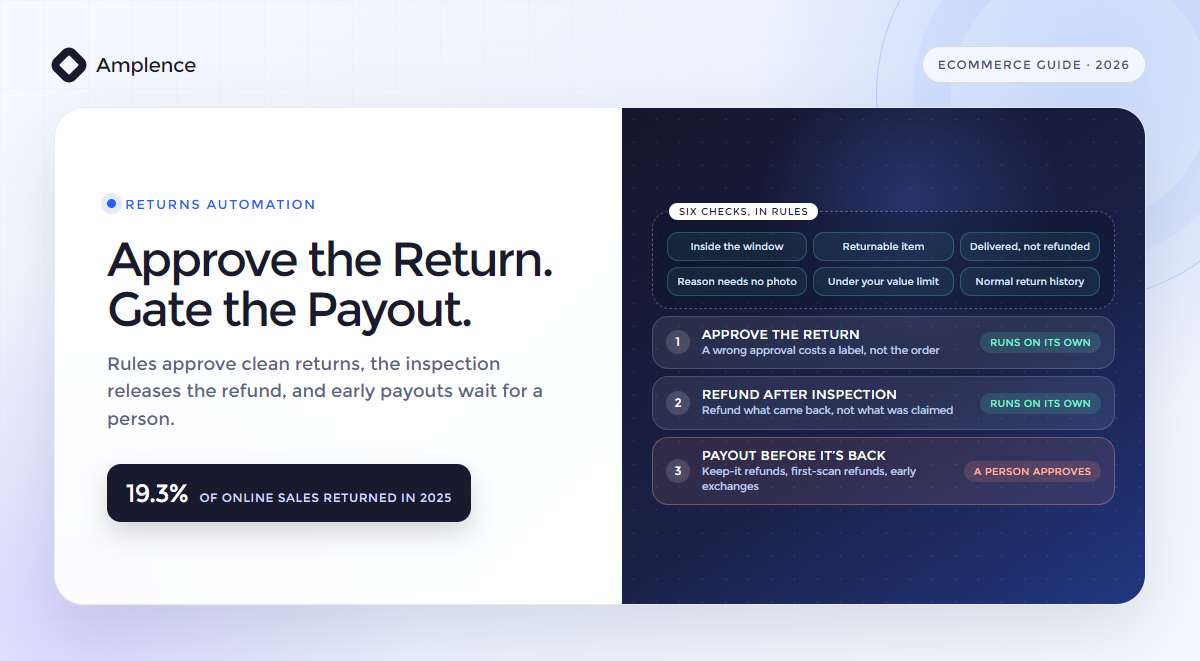
Approve the return. Gate the payout.
Returns automation is software handling the steps between "I want to return this" and "refund issued": checking the request against your policy, approving it and sending the label, keeping the customer updated, and preparing the refund. Approve returns automatically when they pass your rules, because a wrong approval costs a label, not the order. Let the refund follow the inspection, and refund only what came back. Anything that sends money or goods before the item is back, like a keep-it refund, a refund on the first carrier scan or an exchange shipped early, waits for a person above a small limit. Retailers expected 19.3% of online sales to come back in 2025, and 9% of all returns to be fraudulent.
What returns automation actually is
When you hear returns automation, it can mean three different things, and it helps to keep them apart.
The front door is where your customer asks for a return. That's a returns portal, or Shopify's own self-serve returns, where customers request a return from their order status page and you approve or decline it. It collects the request, the items and the reason, and it's the part vendors want to sell you.
Your rules decide what happens to each request. Is it inside your window? Is the item returnable? Has this customer returned half of everything they've bought? The rules approve the clean requests and send the rest to a person with the reason attached.
The money is the refund, the exchange or the store credit you give, and when each one goes out. This is where automation saves you the most time and where careless automation costs you the most. The rest of this guide is mostly about the second and third parts, because that's where your policy lives.
What a return actually costs you
Retailers expected 15.8% of their 2025 sales to come back, $849.9 billion in all, and 19.3% of online sales, according to the NRF and Happy Returns. A 2022 Pitney Bowes survey of 168 US online retailers put the cost of an online return at 21% of order value on average. On a $60 order, that's $12.60 a return.
Automation won't change what your carrier charges you. It changes your handling time. Here's where that time goes on one return, by hand and automated, for an illustrative store.
| Step | By hand | Automated | Who does it afterwards |
|---|---|---|---|
| Read the request and check it against your policy | 3 min | 0 min | Your rules; exceptions go to a person |
| Send the label and return instructions | 3 min | 0 min | The workflow |
| Answer "where's my refund?" emails | 3 min | 0.5 min | Status updates sent before the customer asks |
| Unpack and inspect the item | 5 min | 5 min | A person, and this is the review |
| Issue the refund | 2 min | 0 min | The workflow, for what was received |
| Review the exceptions | 0 min | 0.6 min | A person, for about 15% of returns |
| Per return, at $22 an hour | 16 min, $5.87 | 6.1 min, $2.24 |
The inspection row is the point. The one step that stays with a person is the one that protects your money: someone on your team opening the box and checking what came back. Everything around it is paperwork.
The three moments when money moves in a return
Most returns advice says to keep a human in the loop. That isn't a rule you can build. Here's one you can, the same one our guardrails guide applies to every automated action: let a step run on its own when its error rate times the cost of one mistake is less than a two-minute review, which costs $0.73 at a $22 loaded hour.
Apply it to your returns and three moments stand out, because each one puts a different amount at risk.
| Moment | Example | If it's wrong, you lose | Expected loss at 5% | Route |
|---|---|---|---|---|
| Approving the return | A label sent for a request that passes your rules | The label and handling, about $12 | $0.60 | Runs on its own |
| Refunding after the item is back | Parcel scanned in, unpacked and checked | Little: the person who unpacked it already checked it | Covered by the inspection | Runs on its own, for what was received and under your limit |
| Paying out before the item is back | A keep-it refund, a refund on the first carrier scan, an exchange shipped early | The whole order, $60, with nothing back | $3.00 | A person approves above a small limit |
Seen this way, your worry about automating refunds is mostly misplaced. An approved return costs you a label if it was wrong, and the refund doesn't move until someone has the item in their hands. The risky moment is the third one, and it's also the one stores add to be generous: instant refunds, keep-it refunds and early exchanges. You can still offer them. Just give them a limit and a person above it.
The rules that approve a return
These are the checks a clean return request should pass before it approves itself. Each one is a comparison your system can make without judgment. Each failure goes to your team with the reason written out, so you can decline or approve it in one click.
| Check | What it compares | If it fails |
|---|---|---|
| 1. Inside the return window | The request date against the delivery date plus your window | Held: "requested 41 days after delivery, window is 30" |
| 2. A returnable item | The product against your final-sale products and collections | Held: "final sale item" |
| 3. Delivered, and not already refunded | The order's delivery status and past refunds on the same line | Held: "not yet delivered" or "already refunded" |
| 4. A reason that needs no evidence | Size, fit or changed mind, against damaged, faulty or wrong item | Asks for a photo first, then goes to a person |
| 5. Under your auto-approve value | The value of the items being returned against your limit | Held for a person above the limit |
| 6. A normal return history | This customer's return rate over the last 12 months against your threshold | Held: "8 returns from 10 orders this year" |
We start every store strict, and you should too. Set the auto-approve value low and the history threshold tight, and loosen them when a month of your logs shows that nothing a person approved would have been caught by the rules anyway. Every approval that runs on its own is one nobody looked at.
How to prevent return fraud without punishing good customers
Return fraud is growing, and you can see exactly where. In the NRF and Happy Returns survey, retailers tracking fraud saw increases in overstated quantities (71%), empty-box returns (65%) and decoy returns such as counterfeit items (64%). Close to two-thirds of consumers admitted to at least one costly returns behavior, from wardrobing to sending back different items.
The way to prevent return fraud without annoying your honest customers is to turn each signal into a rule that routes a return, not one that accuses a customer.
| Signal | What it looks like | The rule | Route |
|---|---|---|---|
| Overstated quantity | The claim says three items; the box holds two | Refund what's scanned in, never what's claimed | Automatic, for the received count |
| Empty box | The parcel weighs far less than the items should | Compare the carrier's weight with the expected weight before refunding | Held for a person when it doesn't match |
| Decoy or counterfeit item | A different or fake item comes back | Check serials, tags or SKU labels on high-value items at inspection | Held for a person |
| Wardrobing | Worn, washed or missing its tags | Tags-attached in your policy; condition noted at inspection | A partial refund or a decline, by a person |
| Serial returner | A return rate far above your normal | Flag customers over your threshold across 12 months | Every return from them goes to a person |
| A different refund destination | Asks for the refund on a gift card or another account | Refund to the original payment method only | Automatic rule, no exceptions |
| "It never arrived" | Claims the parcel didn't come | Check the carrier's proof of delivery first | A person above a small value |
You'll notice what isn't in the table: bracketing, where someone buys two sizes and returns one. It's expensive, but it isn't fraud, and treating it like fraud loses you customers. Treat it as a sizing problem, with better size guidance and an easy exchange.
Offer the exchange before the refund
An exchange keeps the sale; a refund doesn't. Your customers want speed as much as money: 76% told the NRF survey they're more likely to choose a return option that gives an instant refund or exchange. So when the reason is size or fit, offer the exchange first, and store credit before cash if your margins need it.
The catch for you is timing. An instant exchange ships the new item before the old one comes back, which makes it a third-moment payout. Offer it without a second thought to customers with a clean history below your value limit. For everyone else, ship the replacement when the return is scanned in by the carrier, or when it arrives.
How to automate returns on Shopify
Shopify gives you most of the front door and some of the rules. Here's how to put the pieces together, in order.
- Turn on self-serve returnsWhere do customers ask?Customers request a return from their order status page, and you approve or decline it. The Flow trigger in step 3 fires on these requests.
- Write your return rulesWhat does your policy say?Set the return window from delivery (14, 30, 90 days, unlimited or custom), your final-sale products and collections, return shipping fees and restocking fees. The rules apply even when you process a return by hand.
- Hear about every requestWho needs to know?Shopify Flow has triggers for each stage of a return, including Return requested, and a template that posts each new request to Slack.
- Approve the clean requestsWhich ones can skip a person?Shopify doesn't approve requests on its own. Flow's Send Admin API request action can call the returnApproveRequest mutation when your conditions pass.
- Add the checks Shopify can't seeWhat does Flow not know?Return history across orders, carrier weights and a Slack approval step for held returns need a returns app or a workflow tool such as n8n.
- Close the loopWhat happens to returns that stall?Flow's templates can cancel returns that were never sent back and release exchange items once the return closes.
Flow will take you a long way if your rules are simple. Its Send Admin API request action can run most Admin API mutations, and Shopify's Flow team fixed a permissions issue with approving returns this way in early 2025. Where Flow runs out for you is history and judgment: counting a customer's returns over a year, comparing a parcel's weight, or asking a named person to approve a held return and recording the answer.
It's the same shape we use in our n8n invoice approval workflow: your code runs the checks, clean items approve themselves, and anything that fails a check or crosses a limit goes to a named person in Slack with the evidence attached. The Shopify order lookup is the one in our n8n Shopify support workflow. If returns exceptions are frequent and messy, our guide to AI agents for ecommerce covers when an agent is worth adding on top, and if you'd rather have the whole thing built, that's what our ecommerce automation services are for.
Where returns automation goes wrong
- Refunding on the first carrier scan. It's a lovely customer experience and an open door for empty boxes. Refund on receipt, or cap first-scan refunds and keep them for customers with a clean history.
- Refunding what was claimed, not what came back. Overstated quantity is the most common fraud increase retailers report. The refund should come from the received count.
- Declining automatically. A wrong decline costs a customer. Let the rules hold the request with the reason, and let a person send the decline.
- Treating bracketing as fraud. Customers buying two sizes are telling you your size guide isn't working. Fix that; don't block them.
- No limit on instant exchanges. An exchange shipped before the return arrives is money out the door. Give it a value limit and a history rule.
- Slow updates. At CollageDepot, slow support responses tracked with a 22% rise in refund requests. Tell customers where their return is before they ask; our customer service automation guide covers how.
Approvals have a failure of their own, too. If every held return needs a person and most get approved anyway, people start clicking approve without reading. Our guide to human-in-the-loop design covers approval fatigue and what the reviewer should see.
What to require from whoever builds it
Whether that's us or anyone else, this is what you should see before returns automation goes live in your store.
- Your return policy written as rules: window, final sale, value limit, history threshold, and who approves what.
- Every held return reaching a named person with the reason and the evidence attached.
- Refunds calculated from what was received and inspected, never from what was claimed.
- Refunds sent to the original payment method only.
- A value limit on keep-it refunds, first-scan refunds and instant exchanges, with a person above it.
- A log of every return, every rule it passed or failed, and every decision, that you can filter without the developer.
- Customers told the status of their return before they ask, from request to refund.
- A monthly report of held returns that were approved anyway, so you know which rules to loosen.
Frequently Asked Questions
What is returns automation?
Software that handles the steps between a return request and the refund: checking the request against your policy, approving it and sending the label, updating the customer, and preparing the refund. Good returns automation approves clean requests on its own, refunds only what comes back after inspection, and sends anything unusual or high-value to a person.
How do you automate returns on Shopify?
Turn on self-serve returns and set your return rules for the window, final-sale items and fees. Use Shopify Flow's Return requested trigger to notify your team, and its Send Admin API request action to approve requests that pass your conditions. For checks Shopify can't make on its own, like a customer's return history or a Slack approval, add a returns app or a workflow tool such as n8n.
Can Shopify approve returns automatically?
Not on its own: self-serve return requests wait for you to approve or decline them. You can automate the approval with Shopify Flow by calling the returnApproveRequest mutation through the Send Admin API request action, or with a returns app that has auto-approval rules.
How do you prevent return fraud?
Turn each fraud signal into a routing rule. Refund what's scanned in, not what's claimed. Compare parcel weights before refunding. Check serials on high-value items. Send returns from serial returners to a person, and refund only to the original payment method. Honest returns pass straight through, and only the suspicious ones wait.
Should refunds be automatic?
After inspection, yes, for what was received and under your limit, because the person who unpacked the item has already checked it. Before the item is back, no: a keep-it refund or a refund on the first carrier scan puts the whole order at risk with nothing returned, so it should wait for a person above a small limit.
What does it cost to process a return?
A 2022 Pitney Bowes survey of 168 US online retailers put it at 21% of order value on average. Handling time is the part automation changes. On our illustrative numbers it falls from about 16 minutes a return to about 6, most of which is the inspection that should stay with a person.
Want your return policy running as rules?
Send us your return policy, a month of return requests and your stack. We'll write the rules, set the limits with you and show you which returns would have approved themselves, before anything touches a live order.
See our ecommerce automation services ↗Sources: NRF and Happy Returns, Consumers expected to return nearly $850 billion in merchandise in 2025 (surveys of 2,006 consumers and 358 ecommerce professionals at US merchants with more than $500 million in revenue, summer 2025); Pitney Bowes, Returns cost US online retailers 21% of order value (BOXpoll survey of 168 US online retailers in February 2022, published 14 April 2022); Shopify Help Center, Self-serve returns and cancellations and return and cancellation rules; Shopify, Flow: new triggers, action and templates for managing returns (16 August 2024) and the Send Admin API request action; Shopify developer documentation, returnApproveRequest; Shopify Community, Return requested trigger with returnApproveRequest (fix confirmed by Shopify staff, March 2025); Amplence, CollageDepot case study.