.svg)


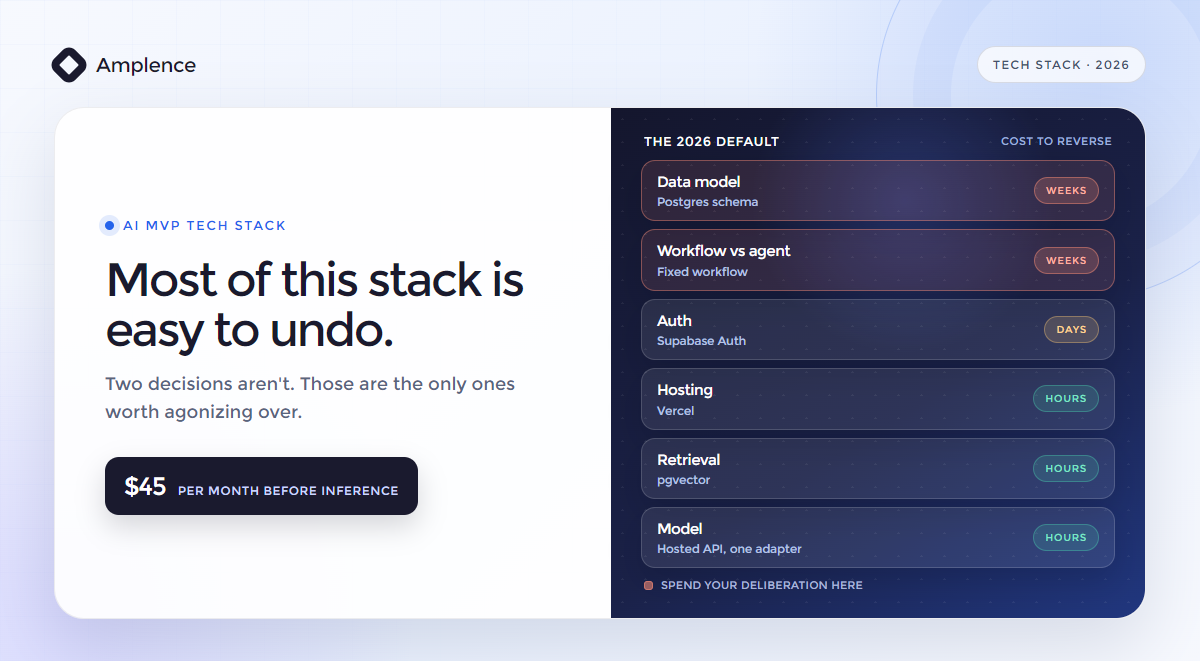
Take the default stack. Spend your thinking on the data model.
Next.js on Vercel, Postgres and auth on Supabase, retrieval on pgvector, Stripe for payments, and a hosted model API behind one adapter. That's the 2026 default and it's right for most AI MVPs. The decision worth agonizing over isn't which of these you pick. It's your data model, because that's the only one that's expensive to reverse.
Every stack guide published this year recommends roughly the same six things. That's not laziness. It's a real consensus, and following it is usually correct.
What none of them tell you is what happens when one piece turns out wrong. Which it will, for about one project in three. So this guide gives you the default stack, the specific condition that breaks each piece, and what the swap actually costs you in time and money.
Every number below comes from vendor documentation with a verification date attached. If you'd rather have someone scope it with you, that's what our AI MVP development work is.
The Default AI MVP Tech Stack in 2026
Here's the whole thing. Six layers, one recommended default each.
| Layer | Default pick | Free tier | Paid entry |
|---|---|---|---|
| Framework and frontend | Next.js 16 | Open source | Free |
| Hosting | Vercel | Hobby, $0 | Pro, $20/mo |
| Database and auth | Supabase | Free, 500 MB | Pro, $25/mo |
| Retrieval | pgvector (inside Supabase) | Included | $0 marginal |
| Model | Hosted API, one adapter | Trial credits | Usage only |
| Payments | Stripe | No monthly fee | Per transaction |
Prices verified 16 August 2026 against Vercel, Supabase and Pinecone. Software pricing moves. Check before you budget.
Roughly $45 a month gets you a deployed, authenticated product with payments and retrieval, before a single token of inference. That's the floor. Everything above it scales with usage.
Why Almost Every AI MVP Tech Stack Looks the Same
Convergence makes engineers nervous. It shouldn't.
These six tools won by collapsing setup time to near zero. Supabase gives you Postgres, auth, storage and a vector extension from one dashboard. Vercel deploys on a git push. Stripe handles payments without a compliance project. The time that saves is time you spend finding out whether anyone wants the product.
There's a hiring argument too. A boring stack means the next engineer already knows it.
The honest counterpoint: a common stack gives you no technical advantage. It can't. Your edge comes from the problem you picked, the data you have, or the workflow you automate. If your pitch is "we built it on a better stack," you don't have a pitch.
The Only Decision That's Expensive to Reverse
Most stack debates treat every layer as equally weighty. They aren't. Some choices you can undo in an afternoon. Others take weeks and touch every line of the product. Rank them by how expensive they are to reverse, and it becomes obvious where to slow down and where to take the default and move on.
One caveat worth stating plainly. Stack choice is rarely why an AI MVP dies. We traced the actual causes in our breakdown of why most AI MVPs never reach production, and the list is dominated by undefined success criteria and unit economics that only worked at demo volume. Getting the stack right removes a distraction. It doesn't save a product nobody wanted.
Frontend and Hosting: When Vercel Is the Wrong Call
Next.js on Vercel is the default because the deploy story is genuinely excellent and the free tier is generous.
Three documented limits decide whether it fits you, all from Vercel's function limits page as of 16 August 2026.
The 4.5 MB body cap. Request and response bodies max out at 4.5 MB, then you get a 413 FUNCTION_PAYLOAD_TOO_LARGE. A 20 MB PDF or a long audio file will not go through your API route, which matters because so many AI products take file uploads. The fix is cheap: upload straight to blob storage from the browser and pass the function a file reference. Design for it up front and it costs nothing. Find it after you've built the upload flow and it costs a day.
The Hobby duration ceiling. Hobby functions cap at 300 seconds, and that's both the default and the hard maximum. No extension. Pro raises it to 800 seconds, with an 1,800 second tier in beta. Long batch jobs need Vercel Workflows or an external queue either way.
Fluid compute changes the cost story. Vercel's docs are explicit that waiting on I/O, which includes calling AI models and querying your database, does not count toward active CPU time. So "serverless is expensive for AI" is now largely out of date. Your function waits eight seconds on a model and you aren't billed CPU for those eight seconds.
When to leave. Here's the unprofitable part: the "Next.js locks you into Vercel" story is mostly wrong. Next.js deployment docs state that a Node.js server and a Docker container both support all features. Static export is the only limited option.
The real portability risk is elsewhere. Only Vercel and Bun are verified adapters running the full compatibility suite. Cloudflare and Netlify ship their own integrations, which the docs describe as "not built on the public Adapter API and not verified by the Next.js team, so feature support and compatibility may vary." Plan your exit to Docker, not to another edge platform.
Database and Auth: When Supabase Is the Wrong Call
Supabase is Postgres plus auth plus storage plus pgvector for $25 a month. Assembling that yourself is a week you don't get back.
Three things to know before you commit, all from Supabase's pricing page, verified 16 August 2026.
Free tier projects pause after one week of inactivity, and you're capped at two active projects. You build a demo, show three investors, come back a fortnight later for the fourth meeting, and it's asleep. If anyone external touches it, pay the $25.
Connections are tighter than you'd guess. The Micro instance covered by Pro's $10 compute credit is 2-core ARM with 1 GB RAM, 60 direct connections and 200 pooler connections. Combine that with Vercel's 1,024 shared file descriptors and the lesson comes from both directions at once: use the pooler, and never open a client per request.
The compliance cliff is the expensive one. Pro is $25 a month. Team is $599. The resources are identical. What Team adds is SOC 2 and ISO 27001. That's a 24 times increase ($599 ÷ $25 = 23.96) triggered not by traffic but by your first enterprise buyer asking for a security report. If you're selling to companies rather than consumers, put that line in your model now.
We default to Supabase Auth because it's bundled, so the marginal cost is zero. Clerk is the better product in isolation and free to 50,000 monthly retained users, but Pro is $25 a month and each SAML connection past the first is $75. Both are fine. Neither is worth a week of debate, because auth is days-to-reverse.
Retrieval: Skip the Vector Database (For Now)
This is where the consensus stacks disagree with each other, and where most MVPs overspend.
pgvector is a Postgres extension. It ships inside the Supabase instance you're already paying for. Marginal cost: nothing. Before you reach for retrieval at all, it is worth reading how to decide between RAG and fine-tuning, because a good share of products need neither.
Pinecone has a free Starter tier at 2 GB and a $20 flat Builder plan. But the plan most teams end up on, Standard, carries a $50 per month minimum before usage, plus $0.33 per GB of storage and $16 to $18 per million read units. At MVP scale, Pinecone's cost is the floor, not the usage. You are paying $50 a month for capacity you won't touch for a year.
The number nobody publishes. The real ceiling on pgvector isn't a vector count, it's how much RAM you're willing to buy. Supabase publishes its own benchmarks by instance size, and they're sobering. At 1,536 dimensions, the OpenAI embedding size everyone defaults to, a Micro instance holds about 15,000 vectors. To reach 224,000 you need a Large instance with 8 GB of RAM. A million vectors wants 32 GB.
Now the lever. Drop to 384-dimension embeddings and that same Micro instance holds about 100,000 vectors at slightly better throughput. Same hardware, same $10 of compute, 6.7 times the corpus (100,000 ÷ 15,000 = 6.67). Supabase's own guidance is blunt about it: "the lower the dimensionality the better the performance."
For most MVP retrieval jobs, searching your own docs, your own tickets, your own product catalog, smaller embeddings are not meaningfully worse. Test both against real queries before you assume you need 1,536.
When Pinecone genuinely earns it: millions of vectors, strict sub-20ms p99 latency, or heavy re-embedding churn that would bloat Postgres. All three are real. None of them describes an MVP with 200 users.
And because embeddings are derived data, this is one of the cheapest decisions on the board to reverse. Re-embed, re-index, repoint. An afternoon.
The Model Layer: Write the Adapter, Not the Bet
Don't pick a model. Pick an interface, then put two models behind it.
One internal function that takes a prompt and returns a completion. Provider-specific code lives on the other side of it. That's the whole discipline, it costs an hour on day one, and it turns "we're locked into a provider" into a config change.
Two facts worth knowing before you route traffic, from Anthropic's pricing documentation, verified 16 August 2026.
Cache reads cost 10% of base input. For any product with a stable system prompt or a repeated document, that's the single biggest lever available. And the Batch API is 50% off both input and output for anything you don't need answered in real time. Overnight classification, backfills, evaluation runs.
Cheaper models are not automatically cheaper in practice. The minimum cacheable prefix runs 512 tokens on Claude Opus 5, 1,024 on Sonnet 5, and 4,096 on Haiku 4.5. It's not monotonic. A short-prompt workload on the cheapest model can quietly never cache at all, while the expensive model caches everything. Check the minimum for the model you actually route to before you assume the cheap one saves money.
We keep the full per-user token arithmetic in the AI MVP cost breakdown rather than repeating it here.
What to Skip in Your AI MVP Tech Stack
Everything below shows up in stack guides. None of it belongs in a first build.
- A dedicated vector database. Covered above. pgvector until it hurts.
- An agent framework. For one workflow, a framework is abstraction you have to learn before you can debug it. Write the loop. When you genuinely need durable multi-step agents, that engineering is its own discipline and we wrote it up in how to build production-ready AI agents.
- Fine-tuning. You don't have the data yet, and you won't until you've shipped. Prompting plus retrieval covers almost every MVP use case.
- Multi-model routing. Route by cost only once usage data shows which requests are cheap. Before that it's premature optimization with extra failure modes.
- Kubernetes and microservices. One deployable unit. You aren't at the scale where service boundaries pay for themselves.
- Custom auth. Never. Use the provider.
- A separate observability platform. Structured logs plus your host's dashboard is enough until you have paying users.
- A staging environment on day one. Per-branch preview deployments already cover most of it, free.
The pattern: skip anything whose job is handling a scale you haven't reached.
The Stacks We Actually Shipped
Generic stack advice is easy to write. Here's what our own builds actually used, and the one component in each that mattered.
Amazon Appeal Wizard is our clearest retrieval case. It indexes 46 real successful appeal templates and retrieves against them to draft a submission-ready plan of action in under three minutes. The interesting part isn't the model, it's that the corpus is small and curated. Forty-six documents needs a vector index, not a vector database. The full build is here, including the 87% success rate across 2,000-plus appeals.
CollageDepot classifies and answers 5,000-plus support emails a month in four languages. We put n8n in front for orchestration and wired it into the Shopify API, because the hard problem was never the model. It was getting order context into the prompt before the model saw the ticket.
My Contractor Report queries five government databases, licensing boards, court records and insurance registries, then returns a risk-scored report in about 30 seconds. React 18 on the front, Supabase for storage, Stripe for payments, Gemini for the scoring pass, and a PDF generation API for the report itself. The engineering challenge was the integrations, not the AI.
Find The Plan is the outlier worth studying. It's a healthcare navigation product built entirely on synthetic data, with no fields for names, contact details, diagnoses or medications. Choosing not to touch protected health information removed an entire compliance workstream from a two-month build. Sometimes the highest-leverage stack decision is a data decision.
When This Stack Is the Wrong Answer
Four situations where you should ignore everything above.
Strict data residency or on-premise requirements. If the contract says data never leaves your buyer's infrastructure, managed services are off the table from day one. That's a different architecture, not a modified one.
Latency budgets under about 100ms. Serverless cold starts and hosted model round trips won't get you there. You need persistent processes and probably a smaller local model.
Real model training. If you're training rather than calling, you need GPUs, experiment tracking and a data pipeline. That's an ML stack, and a PyTorch-and-notebooks setup is closer to right than this one.
Your workflow is deterministic. If the rules can be written down, you don't have an AI MVP. You have an automation project, and it'll be cheaper and more reliable built as one.
How to Choose Your AI MVP Tech Stack in One Sitting
Ninety minutes, in this order.
- Draw the data model. Entities, relationships, and what a user record contains. This is the expensive-to-reverse decision. Everything else follows from it.
- Decide fixed workflow or agent. If you can draw the steps, it's a workflow. Choose the workflow.
- Take the defaults for hosting, auth and payments. Next.js, Vercel, Supabase, Stripe. Don't deliberate. These are hours-to-reverse.
- Start with pgvector. Revisit only when a real query gets slow.
- Write the model adapter before the first model call. One hour, and it buys you every provider decision you'll make later.
- Write down what "working" means as a number before you write any code.
That last one isn't a stack decision, and it's the one that decides whether this ships.
Not sure which layer you will outgrow first?
If you'd rather have someone stress-test the plan before you build on it, we'll walk your data model and your retrieval approach and tell you which piece breaks first. Bring the schema.
Book a 20-minute scoping call ↗Frequently Asked Questions
What is the best tech stack for an AI MVP in 2026?
Next.js on Vercel, Supabase for Postgres and auth, pgvector for retrieval, Stripe for payments, and a hosted model API behind an adapter you control. About $45 a month before inference. Its main virtue is that almost every decision in it is cheap to reverse.
Do I need a vector database like Pinecone for an AI MVP?
Almost certainly not. pgvector runs inside the Postgres you already pay for at zero marginal cost, while Pinecone's Standard plan carries a $50 monthly minimum before usage. Move when you have millions of vectors, need sub-20ms p99 latency, or re-embed constantly.
Should I use Next.js or Python for an AI product?
Both, usually. Next.js for the product surface and API routes, Python as a separate service only if you need libraries the JavaScript ecosystem lacks. If you're calling hosted model APIs rather than training, you may never need Python at all.
Is Supabase good enough for production, or will I outgrow it?
It's production Postgres, so you outgrow the plan long before the database. Watch two thresholds: the connection ceiling on smaller compute instances, and the jump from Pro at $25 to Team at $599 when an enterprise buyer asks for SOC 2.
How much does the AI MVP tech stack cost per month?
Roughly $45 in fixed platform costs, plus inference that scales with usage. Inference is the part that surprises people, and we work through the per-user arithmetic in our AI MVP cost guide.
Can I switch AI model providers later without rewriting the app?
Yes, if every model call sits behind one internal function from day one. That's an hour of work and it turns a provider migration into a config change. Skip it and the same migration touches every file that ever talked to a model.